Your strategy. Our safety layer.
VigilDesk is a local risk-control workstation for MetaTrader 5: per-trade loss caps, daily drawdown guards, and an AI confirmer that reviews your own strategy's orders before they go out.
Mirror | 备用下载:GitHub Releases
Windows may show "Unknown publisher" (we are not code-signed yet): click "More info" then "Run anyway", or right-click the .zip → Properties → Unblock. Compare the SHA-256 with the one we publish if you want to be certain.
Download Pricing Tutorial FAQWhat VigilDesk does | 核心功能
Process guard
Keeps your MT5 terminal and bot alive: crash auto-restart with a restart cooldown and exponential backoff — no restart storms, no dead terminals at 3 am. | 进程守护:崩溃自动拉起,冷却与指数退避 防止重启风暴。
Per-trade loss cap
Set a hard cap on how much any single trade may lose before the order is held. | 单笔亏损上限:超出限额的订单在发出前即被拦截。
Daily drawdown guard
A daily loss limit plus a global-drawdown kill-switch, built for prop-firm rules — one bad day can't blow the account. | 日内回撤 上限 + 全局回撤 kill-switch,适配 Prop-Firm 规则。
AI confirmer
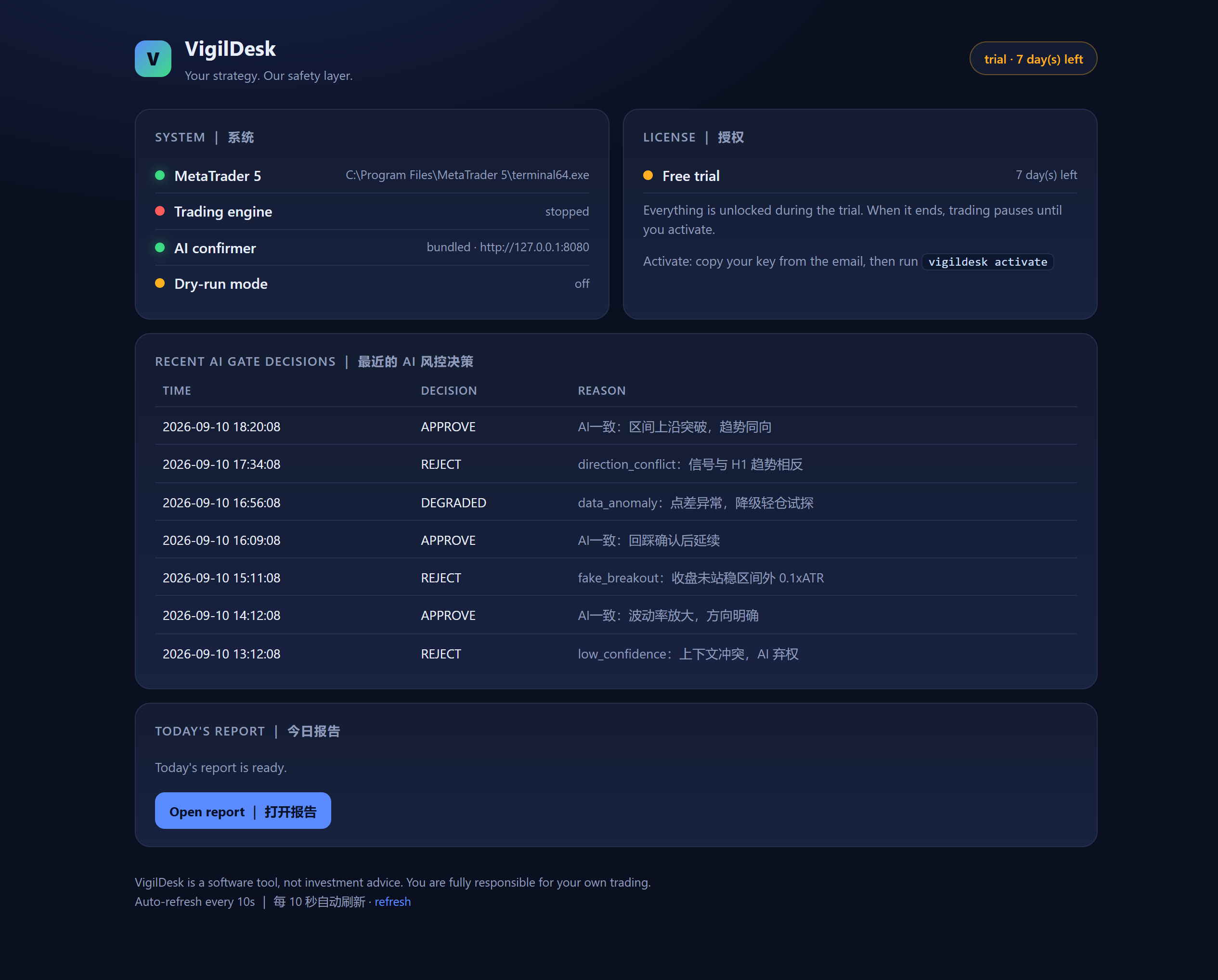
An AI risk gate reviews each order your own strategy produces and records its reason — every pass or hold is logged for review. | AI 风控闸门逐单复核并留痕,可在 dashboard 复盘。
Dry-run first
Smoke-test the whole chain in dry-run mode — orders are simulated until you switch to live guarding. | 先 dry-run 空跑验证链路, 确认无误再切实盘守护。
Your data stays local
Logs, decision records and reports live under
%LOCALAPPDATA%\VigilDesk; inference runs against your own
endpoint; the free edition has no telemetry. | 数据本地留存,推理走
自有端点,免费版完全无遥测。
Download
Windows 10/11. Point VigilDesk at
terminal64.exe, pick your AI model, set risk limits,
and smoke-test in dry-run mode. Installers are published through
GitHub Releases. | 安装包经 GitHub Releases 分发,首次运行向导
四步完成配置。
Pricing
Start free with Watchdog Lite — free forever, no card required. Same download: unzip and run VigilDesk.exe lite to keep your MetaTrader terminal alive 24/7. No license, no account, no telemetry.
Pro — full risk-control workstation, subscription.
Lifetime — all future updates.
Get started
New here? Follow the tutorial: install → configure → run the bot → read the logs. Then read how we handle security and compliance.
Read the tutorial · Security & complianceSupport & feedback
Self-serve FAQ covers installation, activation, MT5 paths, models, firewall and refunds. Found a bug or want a feature? Tell us — feedback is triaged every 3 days and planned every week. (中文:自助 FAQ 覆盖安装、激活、MT5 路径、模型、防火墙与退款; 遇到问题或有建议请告诉我们——反馈每 3 天分拣、每周排期。)
Browse the FAQ · Send feedbackWhat you actually see | 你每天看到的界面
System status, your licence state, and every AI risk-gate decision — logged and explained, not hidden.